SYNTVEX
SYNTVEX 1.0 — Music Programming Studio
Write code. Shape sound. Compose your own music.
SYNTVEX was previously known as SONIVEX. The name has been changed to give the project a more distinctive identity, as the original name was already used elsewhere.
SYNTVEX is a free, browser-based music programming environment that turns code into sound. Compose melodies, chords, drum patterns, synthesizer parts, sound effects, and structured musical arrangements using a custom text-based music language.
Instead of generating finished tracks automatically, SYNTVEX gives you direct control over musical patterns, instrument settings, synthesis, audio processing, and export. Start with a built-in example, modify it, or build a composition from scratch.
FREE TO USE · NO WATERMARKS · NO ACCOUNT REQUIRED
Create music, experiment with sound, and export your work without a paid subscription. SYNTVEX does not add its own branding to exported audio.
Complete guide
Complete Function Reference
A. Language Commands (Top Level)
bpm 120              # speed in beats per minute ("tempo 120" also works)
swing 0.35           # global swing (0..1): every 2nd step is delayed
transpose 3          # shift all notes by semitones (-/+)
loop 8               # optional global loop length in bars
section chorus       # start a named section (also: sec)
arrange intro drop intro drop   # playback order of sections
inst bass preset=bass vol=0.7 ...   # declare/configure an instrument
play bass div=8: C2 . C2 . G1 . Bb1 .   # note pattern for it
# starts a comment. A bpm line set before any section applies to the whole track (the last value wins); once a section appears, each additional bpm line takes effect inside its section — this is how parts get their own speed. Fewer bpm = slower music; the rhythmic subdivision comes from div on play lines.
B. inst — Instrument Declaration
Each line declares one instrument: inst NAME preset=SOUND param=value param=value ....
- NAME is any custom identifier you choose (e.g.
lead1,myGrit) — it appears in the SOUND list in LIVE mode (press ↻ after editing). - preset= picks the base sound and synthesis engine. If omitted, defaults to
piano. Available:drums(drum machine) plus everything from the sound catalog (section D). - All
param=valuepairs override the preset's parameters — every number or choice below can be set here, so one inst line can carry 30–50+ parameters. Mistyped keys are ignored rather than breaking playback.
Envelope, filter, amp — all engines
a d s r— attack, decay, sustain, release in seconds (e.g.a=0.01 d=0.3 s=0.8 r=0.2).cut— filter cutoff in Hz;ftype— lowpass|highpass|bandpass|notch|peaking|lowshelf|highshelf;q— resonance.fe/fd— filter envelope amount and decay;kt— key tracking (cutoff follows pitch);vk— velocity→filter.hp— high-pass shelf in Hz;drive+bias— waveshaper distortion;crush— bit-crush (1–12).trem+tremf— tremolo depth/rate;vib+vibd+vdel— vibrato rate, depth (cents), start delay.lvl— output level (ks/modal/nz);len— string-sample length (ks).
Synth engine syn (piano/bass/lead/pad/... and most sounds)
wave=sawtooth— sine|square|triangle|sawtooth|pulse12|pulse25|pulse50 (pulse widths in %);duty— generic pulse width.uni=1..9+spread=14— unison voices and detune spread (cents);drift— random per-note detune.subl=0.5— sub-octave layer;pe/ped— pitch envelope (semitones, time);glide— portamento in seconds (legato, also works in LIVE);breath+bf— breath-noise layer.L— the multi-oscillator stack presets are built from: [wave, detune cents, gain, ratio];fm=[ratio,index,decay]— built-in FM modulation of the first oscillator.
FM engine eng=fm (fm_ep, fm_bass, growl, ...)
cr— carrier ratio;det— dual-carrier detune.m1/i1/id1/ms/ia— modulator 1: ratio, index, index decay, sustain floor, index attack.m2/i2/id2/ms2— optional modulator 2;alg=1chains it into modulator 1 instead of the carriers.
Wavetable engine eng=wt (hollow, reed, buzz, wt_glass, ...)
harm=24— partials (2–128);roll=1.3— harmonic rolloff;odd=1— kill even harmonics.form+formw+fgain— formant bump (position/width/gain).harm2 roll2 odd2 form2— second table with crossfademt(duration) starting atmd— table morphing.
Vocal engine eng=formant (vox_ah, choir, vox_robot, ...)
vowel=0..4— a e i o u;vowel2+vgl/vdl— morph to a second vowel (time/delay);vowj— per-note jitter.fsh— formant shift;fq— formant resonance;fg— focus gain.
Noise engine eng=nz (riser, wind, ocean, rain, ...)
nt=0..2— white/pink/brown;nft— filter type;nq— resonance.c0→c1— frequency sweep over timesw;nkt— key tracking;wl/wd— slow LFO rate/depth.
Plucked strings eng=ks (Karplus–Strong: acoustic, mandolin, metal_rhythm, ...)
dec— 0.98–0.9999 string decay;bri— pluck brightness;pos— pluck position.k— damper;mute— muting/chug;len— sample length (s).
Modal mallets eng=modal (bell, marimba, gong, ...)
parts=[[ratio,amp,damp],...]— resonant partials (add inharmonicity for metallic tone).dec— decay (s);damp;bri;click— strike click;trem/tremf.
Mix chain — per-instrument FX bus
vol,pan(−1..1);apan=0.5+apand=0.5— auto-pan rate/depth.rev=0.4+rsz=2— reverb send/room size;dly=0.3+dt=0.5(time in beat fractions) +dfb=0.45(feedback) +dcut=2600(tone) — delay.cho=0.4+chor=0.7— chorus;comp=0.5— compressor;sat=0.5— saturation;tape=0.5— tape wobble;vinyl=0.3— crackle.hpf=80/lpf=8000; 3-band EQ:lo=-2,mid=3+midf=1200,hi=2.pump=0.7+pumpr=0.22— sidechain-style ducking; every kick (k/z) re-inflates it for the EDM pumping feel.dbl=0.5— automatic double-tracking (two detuned voices panned left/right).
C. play — Note Patterns
play NAME (the inst name) optionally with header parameters, then : and the pattern:
play lead div=8 start=2 vel=0.8 gate=0.95 swing=0.2 human=0.05 dyn=0.2: C4 D4 E4! G4 C4_ . Bb3 * 4
div=16— grid: 16 = sixteenths, 8 = eighths, 4 = quarters, 32/64 = finer (faster notes).start=0— starting bar (0 = track beginning);* Nat the pattern end repeats it N times.vel=0.8,vel2=1.2— velocity ramp across the pattern;gate=0.95— note length as a fraction of the step (0.5 = staccato, 1+ = legato);swing;human— timing+velocity randomization;dyn— dynamics variation.- Pattern symbols:
.~-= rest;_= sustain the previous note;|= visual separator;!= accent (×1.3);?= quiet (×0.55). - Notes:
C4 D#4 Eb3 Fb2(any octave; sharps/flats allowed). Chords:Cmaj7 Am G7@2 Ep@2— type suffix + optional octave. Types: major (default), m, p (power), dim, dim7, m7b5, aug, sus2, sus4, 6, m6, 7, maj7, m7, mmaj7, 9, maj9, m9, add9, 11, 13 (+ aliases min, M, dom7, mi7...). Explicit simultaneous notes:C3+E3+G3. - Chord behaviors from the inst line:
arp=up|down|updown|rand +rate=N(arpeggio speed),chord=root(only the lowest note — for basses),strum=0.025(staggered notes, like a strummed guitar).
D. Sound Catalog — All Presets
- Rock / metal: metal_rhythm, metal_chug, hardrock_gtr, rock_clean, gtr_lead, metal_bass
- Pop / trend: pop_stab, pop_pluck, pop_pad, pop_bass, bass_808
- Keys: felt_piano, dream_keys, piano, epiano, wurli, fm_ep, fm_clav, organ, rotary_organ, fm_organ
- Guitars / plucked: acoustic, nylon, egtr, egtr_od, egtr_dist, fuzz, gtr_muted, bass_e, bass_slap, harp, banjo, ukulele, mandolin, koto, sitar
- Mallets / bells: vibes, marimba, kalimba, glock, tubular, steeldrum, bell, fm_bell, fm_wood, musicbox, handpan, crotales, bowl, gong, timpani, woodblock
- Winds / brass: flute, clarinet, sax, brass, fm_brass, hollow, reed
- Pads / strings: warm_strings, air_pad, tape_pad, solo_cello, strings, pad, analog_pad, dark_pad, glass_pad, wt_glass, wt_morph
- Bass: analog_bass_soft, lofi_bass, bass, sub, fm_bass, fat_bass, wobble, reese, growl, sub_drop, moog, acid303
- Leads / synths: soft_lead, lead, supersaw, edm_lead, trance_pluck, hoover, pluck, wt_pluck, buzz, laser
- Vocal: choir, vox_ah, vox_oo, vox_ee, vox_wah, vox_choir, vox_robot
- 8-bit: chip_lead, chip_lead12, chip_bass, chip_zap
- Noise / FX: riser, downlift, whoosh, wind, ocean, rain
- Drums: preset=drums — built-in drum machine (section E)
Preview any of them in the SOUND menu (♪ — preview, + — insert an inst line into the code), then adjust it with the parameters above.
E. Drums — preset=drums
inst kit preset=drums vol=0.8 kit=metal tune=1.05 dec=1.1 tone=1.2
play kit div=4: k . | S . k o s? . k . h o h . r x
Hits: k kick, z 808 kick, s snare, h closed hat, o open hat, c crash, t tom, r rim, x splash, b cowbell, w woodblock, g conga, p shaker. Uppercase = accent; k+s plays simultaneous hits. Parameters: kit=rock|metal|pop|trap, tune (pitch), dec (length), tone (noise brightness). Kicks also re-trigger pump-ducked instruments.
F. Song Arrangement
bpm 100
section intro
bpm 100
...
section drop
bpm 140
...
arrange intro drop intro drop
A section (or sec) starts a named block; lines after it belong to it until the next header. Sections may repeat in arrange, and each section can contain its own bpm, which applies from that line onward. Lines before the first header form an unnamed starting block. Arrangement mode has its own playback structure rather than the older global loop.
G. Low-Level Node Layer
Beyond instruments you can wire a custom audio graph from named nodes connected by name:
osc— sine/square/sawtooth/triangle (freq, FM input, detune);noise— white/pink/brown.gain— signal level;filter— mode +cutoff+q+gain;env— a/d/s/r, hold, curve;lfo— wave + freq.math—mul/addparameter transforms;mix— combine signals;drive;pan;duck— sidechain by another node.chorus,reverb,delay— effects;out— final output.
Drive them over time with seq (value sequences per step), step (trigger patterns), and fire name param ... (explicit triggers). Parameters accept arithmetic expressions, note names (A3 → its frequency), and BPM-relative steps (1/8-style divisions). Node outputs can modulate other nodes — envelopes become LFOs, control filters, etc. Circular dependencies are reported as errors. This layer is for sound design and rhythm machines not covered by presets; MIDI export covers only the instrument layer, so node-driven audio exports as WAV/OGG only.
H. Mastering, Export, Files
Master modes: CLEAN (dry bypass), GLUE (light compression + air), LOUD (modern loud: bigger shelf boost, faster compression, drive, +15% gain) — all end in peak limiting.
Export: WAV 16-bit 44.1 kHz offline render with 1/2/4/8 loop repeats; OGG Opus 48 kHz via WebCodecs (browser-dependent; much smaller files); MIDI Standard MIDI File 1, one track per instrument, drums on channel 10 (GM-style mapping; node events not included).
Files: SAVE → timestamped .sf.txt; OPEN ← .txt/.sf/.md; SHARE → a URL with the compressed code Base64-encoded in the hash (#m=...) — nothing is uploaded, links work even from a local file:// page. Code auto-saves to browser storage; custom presets export/import as JSON packs (📥).
I.1. Creating Custom FX Presets
SYNTVEX lets you create your own custom FX configurations directly in your music code. You can start with an existing preset and override its parameters, or combine individual parameters to build a completely new effect configuration. No engine source-code changes are required.
Using an Existing Preset as a Starting Point
bpm 120
fx my_radio preset=radio lp=2200 drive=5 rev=0.3
my_radio— your custom effect name.preset=radio— loads the existingradiopreset as a starting point.lp=2200— overrides the low-pass filter frequency.drive=5— adds distortion.rev=0.3— sets the reverb amount.
Any parameters specified after the preset override the corresponding preset values. The original built-in preset is not modified.
Building a Custom Configuration from Scratch
fx my_effect lp=3000 drive=4 rev=0.5 mix=0.8
When no preset is specified, SYNTVEX starts with the default FX parameter values and applies the parameters you provide. You can combine supported parameters to shape the sound to your needs.
Chaining Multiple Effects
bpm 120
fx tape
fx my_echo preset=ghost mix=0.4
fx final_filter lp=8000
Multiple fx lines are processed in order, allowing you to build a
global effects chain. Each effect processes the output of the previous effect.
Important Notes
- Custom FX configurations are defined in your music code.
- Effect names are labels; they do not create new DSP algorithms.
- Use
preset=NAMEto start from a built-in preset. The preset name must exist. - Parameter names and values must be supported by the SYNTVEX FX engine.
- Available built-in presets include
radio,speaker,telephone,megaphone,walkie,vinyl,tape,lofi,tv,underwater,club,cathedral,gameboyandghost.
1. Studio Interface
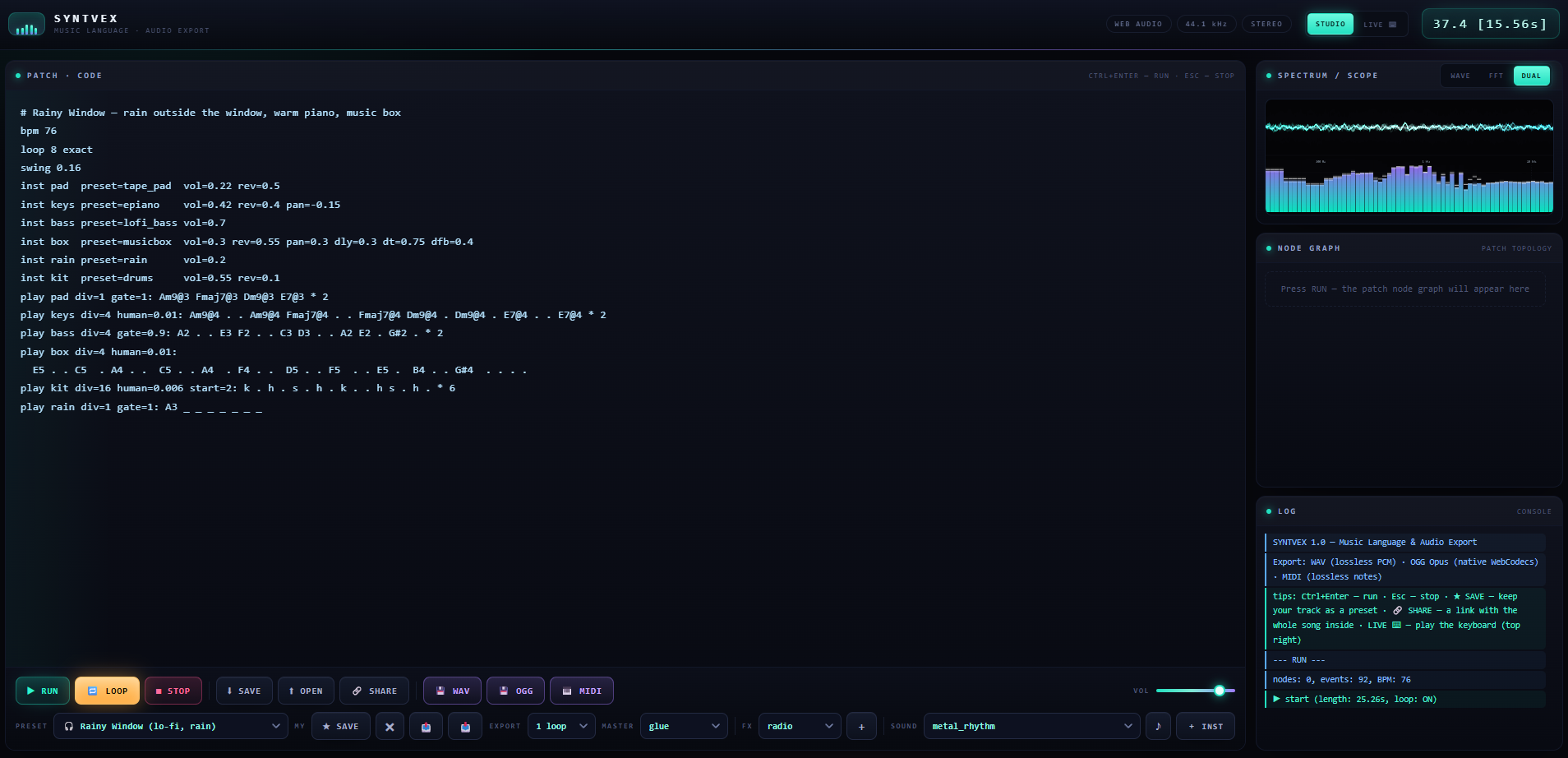
SYNTVEX features a dark, neon-inspired interface with two working modes:
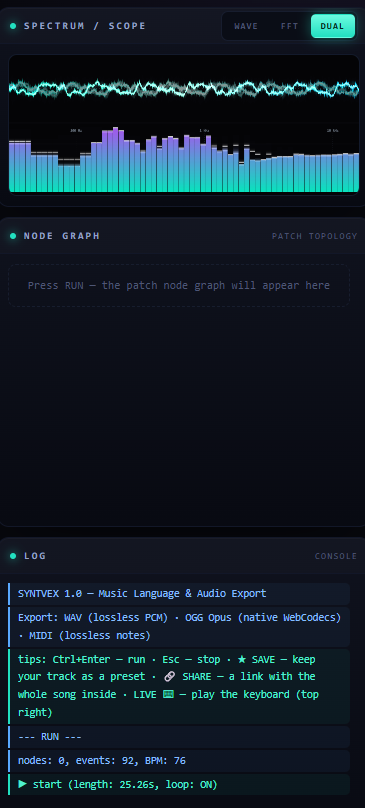
- STUDIO — code editor, playback controls, waveform and spectrum visualizers, audio-node information, and diagnostic console.
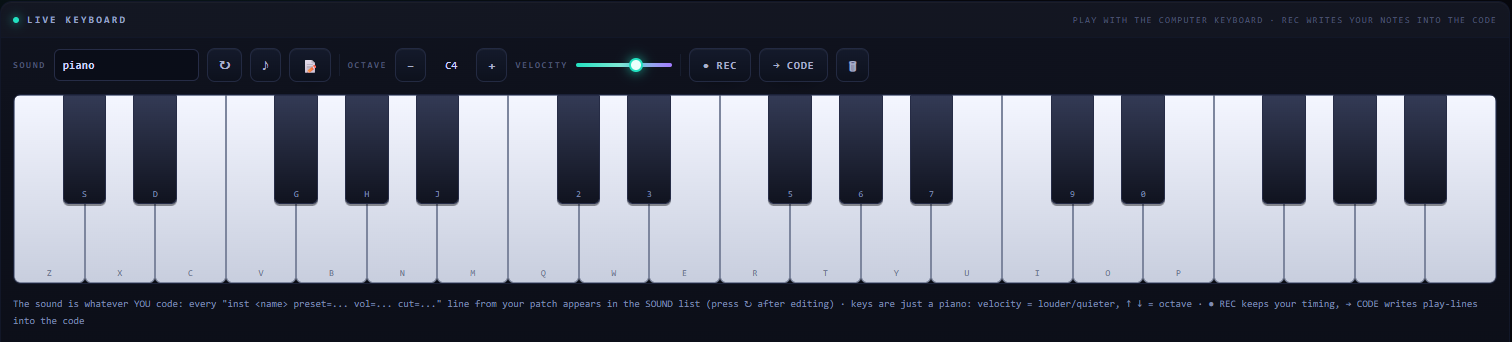
- LIVE — virtual piano keyboard for testing sounds, playing notes, and recording musical ideas.
The interface also includes a musical clock, playback controls, and a real-time audio visualization area.
Audio is powered by the browser's Web Audio API. The application uses stereo audio, with 44.1 kHz used for offline WAV rendering.
2. Code Editor and Playback
Write compositions using SYNTVEX's text-based music language.
- Monospaced code editor with Tab indentation.
- Automatic saving of the current code in browser storage.
- Save and open code files.
- Ctrl+Enter / Cmd+Enter — run the composition.
- Esc — stop playback.
- LOOP — repeat playback, with configurable loop lengths.
- Color-coded diagnostic messages to help identify errors and inspect execution.
RUN parses the code and schedules the supported musical events. STOP is available to stop active playback and silence the audio system.
3. Presets and Sound Library
Start with built-in compositions and sound experiments, inspect their code, and change them to suit your project.
Examples cover guitar-based music, cyberpunk, synthwave, techno, ambient textures, lo-fi, house, sound-design experiments, and other electronic styles. Additional examples demonstrate low-level audio programming and section-based arrangements.
The sound catalog includes:
- Electronic and FM synthesizers.
- Wavetable-style and formant-based sounds.
- Plucked strings, guitars, basses, bells, mallets, and other tonal instruments.
- Vocal-style and breath-like sounds.
- Noise textures and sound effects.
- Retro and 8-bit-style sounds.
- Drum kits for different musical styles, including rock, metal, pop, and electronic rhythms.
- Sound palettes for genres such as industrial, dubstep, riddim, DnB, techno, synthwave, and other electronic music.
You can preview catalog sounds and insert an instrument declaration into the editor. A preset provides the starting sound; supported parameters on the inst line let you adjust it.
Custom Presets
Build a reusable collection of your own compositions:
- Save the current code as a named preset.
- Delete saved presets.
- Export your presets as a JSON package.
- Import preset packages into the browser.
Custom presets are stored locally in your browser. Export them to keep a backup or transfer them to another environment.
4. LIVE Keyboard
LIVE mode lets you perform notes using the virtual keyboard or your computer keyboard.
Features include:
- Built-in sound selection.
- Instruments declared in your current code.
- Note highlighting while playing.
- Octave shifting.
- Adjustable velocity.
- Recording note presses, releases, and timing.
- Clearing a recording.
- Sending recorded notes back to the code editor.
Use REC to capture an idea, then choose CODE to turn the recording into editable musical code. The generated code uses an instrument declaration and a note pattern with rests and sustain markers.
For instruments defined in your code, edit their settings in STUDIO and refresh the LIVE sound list when necessary.
5. Visualizers and Diagnostics
SYNTVEX includes three visualization modes:
- WAVE — waveform display.
- FFT — spectrum display with logarithmically spaced frequency bands and peak hold.
- DUAL — waveform and spectrum together.
The visualizers use a retro electronic-instrument aesthetic with a phosphor-style afterglow.
The node panel displays information about audio nodes after execution, including their types and parameters. The diagnostic console shows color-coded errors, successful operations, informational messages, and warnings.
Use the console to identify parsing problems and understand what happened when your composition was run.
6. Two Music Programming Layers
SYNTVEX combines instrument-based composition with low-level audio programming. You can work with musical notes and presets or build audio networks from individual processing nodes.
Instrument Layer
Use inst to declare an instrument and play to define its musical pattern.
bpm 120
inst bass preset=bass vol=0.7 rev=0.1
play bass div=8: C2 . C2 . G1 . Bb1 .
Each declaration is written on its own line. The inst name identifies the instrument within your code, while preset= selects its starting sound. If preset= is omitted, SYNTVEX defaults to piano; an arbitrary instrument name does not automatically create a new synthesis engine.
Supported features include:
- Individual notes, chords, power chords, and chord aliases.
- Rhythmic divisions and starting positions.
- Swing and humanization.
- Gate length, velocity, accents, and dynamic variation.
!for accented notes and?for quieter notes..for rests and_for sustaining a note.|as a pattern separator and* Nfor repetition.- Arpeggiation modes, including ascending, descending, up-and-down, and randomized patterns.
- Chord handling, octave offsets, and strumming controls.
- Character-based drum patterns, simultaneous drum hits, accented hits, and supported drum-sound controls.
Chord support includes major, minor, power, seventh, major seventh, minor seventh, diminished, augmented, suspended, sixth, add9, ninth, eleventh, and thirteenth chord forms, subject to the language's supported notation.
Low-Level Node Layer
Build audio networks from individual components and connect them using node names.
Available node types include:
osc— sine, sawtooth, square, and triangle oscillators, with detuning and FM support.noise— white, pink, brown, and other supported noise types.gain— signal level.filter— low-pass, high-pass, band-pass, notch, peaking, and shelf filtering.env— envelopes and amplitude shaping.lfo— periodic modulation signals.math— parameter transformations and arithmetic expressions.mix— combining audio signals.drive— distortion and saturation.pan— stereo positioning.duck— sidechain-style signal control.chorus,reverb, anddelay— audio effects.out— audio output.
Parameters can use supported expressions, musical note names, and BPM-based timing. Circular node dependencies are reported as errors.
The language also supports fire triggers, step trigger patterns, and seq parameter sequences for controlling nodes over time. These features make it possible to create rhythmic and evolving sounds without relying exclusively on instrument presets.
7. Song Arrangement
Compose longer pieces using named sections and an arrangement sequence.
section intro
bpm 100
section drop
bpm 140
arrange intro drop intro
Sections provide a way to organize a composition into named parts. The arrangement sequence determines the order in which those sections are played, and section-based compositions can use different tempos.
Use this system to structure intros, verses, drops, transitions, and other parts of a track. Arrangement mode has its own playback structure rather than relying solely on the older global loop behavior.
8. Synthesis Engines
SYNTVEX includes several synthesis engines for different types of sound:
syn— the standard synthesizer engine, with oscillator-based sound generation and supported controls such as unison, detuning, pitch envelopes, glide, sub-octaves, tremolo, and vibrato.fm— frequency modulation for metallic tones, bells, and complex electronic timbres.wt— wavetable-style harmonic construction, shaping, and morphing.formant— vocal-style sounds with formants, vowel selection, and transitions.nz— noise-based synthesis and sound effects.ks— Karplus–Strong-style plucked-string synthesis.modal— resonant partials for bell-like, mallet-like, and other tonal sounds.
The engine used depends on the selected sound preset. Available controls vary by engine and preset, so not every parameter applies to every sound.
9. Effects and Sound Design
SYNTVEX provides instrument-level controls and audio-processing options for shaping a sound.
Depending on the selected preset and supported parameters, these include:
- Volume and stereo positioning.
- Reverb and delay, including supported timing, feedback, and filtering controls.
- Filtering and filter modulation.
- Distortion and bit-crushing.
- Chorus and stereo widening.
- Tremolo, vibrato, and pitch-envelope controls.
- Unison and detuning.
- Arpeggiation and strumming.
- Swing, humanization, gate, velocity, and dynamic variation.
- Additional preset-specific controls for specialized instruments and sound effects.
Low-level audio nodes provide another way to build processing chains and experiment with modulation, signal mixing, and effects.
The available controls depend on the synthesis engine and the instrument preset. SYNTVEX is designed for experimentation, so you can begin with a preset and gradually modify its sound.
10. Mastering
Choose one of three master-processing modes in the interface:
- CLEAN — the clean master-processing option.
- GLUE — a more cohesive sound using additional processing.
- LOUD — a stronger, louder-oriented processing option.
The master chain includes dynamics control and peak limiting. The modes offer different starting points for a mix, but their results depend on the material being played.
11. Audio Export
SYNTVEX supports three export formats, with different capabilities and requirements.
WAV
- Offline audio rendering.
- 16-bit PCM output.
- 44.1 kHz sample rate.
- Choose 1, 2, 4, or 8 loop repetitions.
WAV is the straightforward option for exporting rendered audio without relying on browser WebCodecs support.
OGG Opus
- Uses browser WebCodecs audio encoding and SYNTVEX's Ogg muxing implementation.
- Encodes audio at 48 kHz.
- Can produce substantially smaller files than WAV, depending on the content.
- Requires compatible browser WebCodecs support.
If OGG export is unavailable in your browser, use WAV instead.
MIDI
- Standard MIDI File format 1.
- Separate tracks for instruments.
- Drum events use MIDI channel 10 with General MIDI-style drum-note mappings.
MIDI export covers supported instrument and drum events. It does not export the complete sound generated by the low-level node layer, including its fire and seq events.
Use WAV or OGG Opus when you need the rendered audio rather than note data.
12. Save, Open, and Share
SYNTVEX provides several ways to preserve and transfer your work.
- SAVE — download the current code as a timestamped
.sf.txtfile. - OPEN — load supported
.txt,.sf, or.mdfiles. - SHARE — create a link containing the composition's code.
Share links compress the code, encode it in a URL-safe Base64 format, and place it in the URL hash using #m=. The composition is embedded in the link rather than uploaded to a dedicated SYNTVEX composition-hosting server.
This also allows share links to work when SYNTVEX is opened from a local file:// URL. Very large compositions produce longer links.
The current code and custom presets are stored locally in your browser. Downloaded code files and JSON preset packages provide portable backups.
13. Browser Notes and Limitations
- Your browser may require a user interaction before audio playback can begin.
- OGG Opus export depends on WebCodecs support.
- MIDI export does not cover every feature of the low-level node system.
- Global loop length can be adjusted to fit a composition; exact loop lengths may cut off material that extends beyond the requested duration.
- Section-based arrangements use their own playback structure.
- Visualizer updates pause when the page is hidden.
- Use STOP to silence active playback.
SYNTVEX runs in a browser and relies on browser audio capabilities. Available features may therefore vary between browsers.
Who Is SYNTVEX For?
- Programmers — explore music as code and build reusable audio networks.
- Musicians — compose melodies, chords, rhythms, and arrangements.
- Sound designers — experiment with synthesis, modulation, filtering, and effects.
- Game developers — create and export music, loops, atmospheres, and sound palettes for projects.
- Curious creators — start with an example, change a few notes, and discover how code affects sound.
Get Started
- Open SYNTVEX in a supported browser.
- Select a built-in example.
- Change a note, instrument preset, or supported parameter.
- Press RUN and listen.
- Try LIVE mode to play and record notes.
- Save your presets, export your music, or share a composition link.
Tip: AI assistants can help you write code for SYNTVEX, but they do not replace the audio engine. Share the relevant language syntax, ask for a composition, run the generated code, and use the diagnostic log to investigate errors.
SYNTVEX 1.0 — by KonKavCode
A browser-based music programming environment combining code-driven composition, virtual instruments, synthesis, real-time visualization, arrangement tools, effects, mastering, and audio export.
SYNTVEX is not an AI music generator. You create and control the music yourself.
Write the patch. Run the sound. Make it yours.
Development log


Leave a comment
Log in with itch.io to leave a comment.